Instant QR

Paying with ATH Móvil is now faster than ever*.

ATH Móvil Checkout
ATH Móvil Checkout

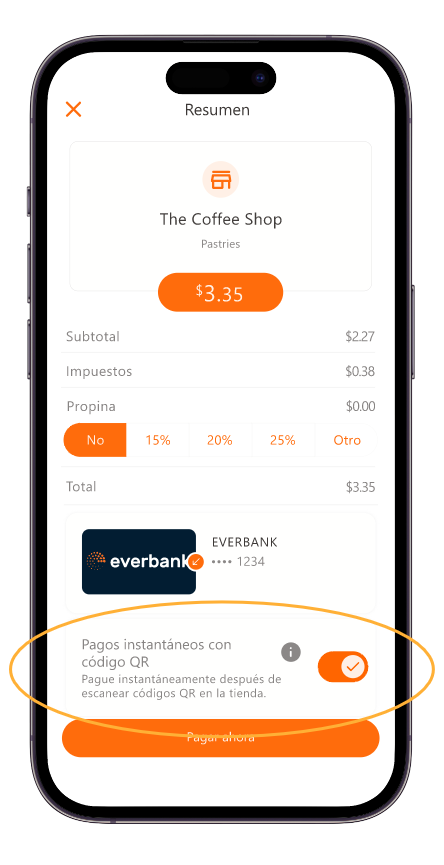
How to activate Instant QR at checkout?

  • 1 After scanning the QR, select Instant QR Payments (you only need to do this once) on the summary screen
  • 2 Tap Pay Now
  • 3 That’s it! From now on, payments will be instant when you scan the business’s QR code
ATH Móvil Home

How to activate Instant QR in Settings?

You can also enable it from Settings:
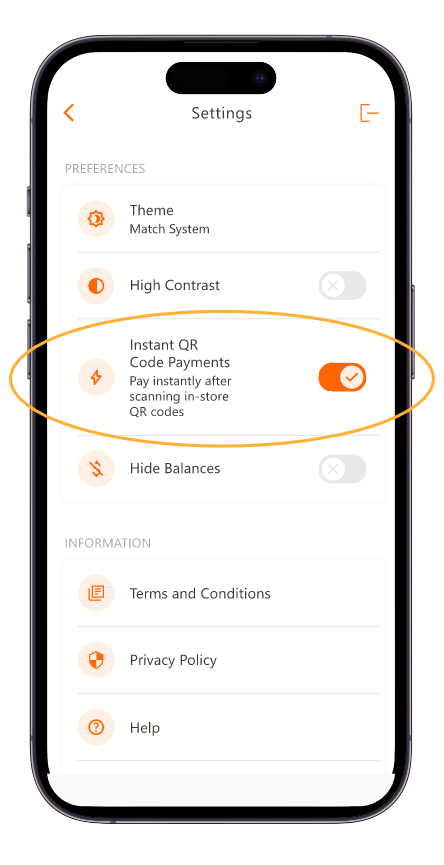
  • 1 Go to your ATH Móvil account settings
  • 2 Turn on the Instant QR button and you're all set!
  • 3 You can now pay in seconds!
ATH Móvil Home
Follow Us on Social Media